> For the complete documentation index, see [llms.txt](https://docs.hablla.com/llms.txt). Markdown versions of documentation pages are available by appending `.md` to page URLs; this page is available as [Markdown](https://docs.hablla.com/hablla-docs-en/hablla/marketing/form.md).
# Form
The **Hablla Forms** allow you to create data capture interfaces by **drag-and-drop** (drag-and-drop).\
You build the layout, configure each field and publish it for use in pages, flows and integrations.
> **How it works:** choose the components, drag them to the editing area and adjust the properties in the configuration tabs of each field.
### Component library
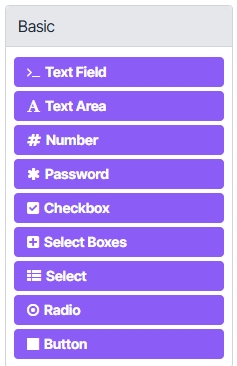
#### Basic
* **Text Field**: short text field (e.g.: name).
* **Text Area**: long text (notes).
* **Number**: integer/decimal numbers.
* **Password**: password (hidden).
* **Checkbox**: true/false.
* **Select Boxes**: multiple selection via checkboxes.
* **Select**: dropdown list (one option).
* **Radio**: single selection via radio buttons.
* **Button**: action buttons (Submit, Back etc.).
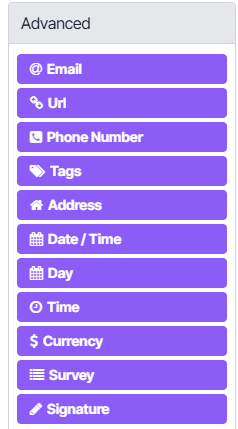
#### Advanced
* **Email** • **Url** • **Phone Number**
* **Tags**: multiple values with chips.
* **Address**: structured address.
* **Date/Time** • **Day** • **Team**
* **Currency**: monetary values.
* **Survey**: question matrix.
* **Signature**: digital signature.
#### Layout
* **HTML Element**: free HTML block.
* **Content**: static text/MD.
* **Columns**: responsive columns.
* **Field Set** • **Panel**: group fields.
* **Table**: simple tabular grid.
* **Tabs**: tabbed navigation.
* **Well**: highlight box.
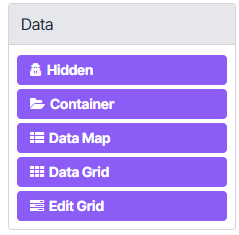
#### Data
* **Hidden**: hidden value (e.g.: UTM).
* **Container**: object with subfields.
* **Data Map**: dynamic key/value pairs.
* **Data Grid / Edit Grid**: editable lists (repeatable rows).
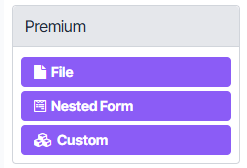
#### Premium
* **File**: file upload.
* **Nested Form**: reuse another form.
* **Custom**: custom-logic component.
***
### Configuration of each field
Each component has configuration tabs. The most used:
* **Display**\
Label, placeholder, help (tooltip), label position, input and display mask, CSS class, visibility.
* **Data**\
Internal key (`key`), default value, data source (static, remote), value/label map, persistence.
* **Validation**\
Required, minimum/maximum length, regex, numeric limits, custom error messages.
* **API**\
Property name, reference for integrations and webhooks.
* **Conditional**\
Show/hide based on rules (e.g.: “show *Phone* if *Receive contact via WhatsApp* = Yes”).
* **Logic**\
Actions on value change (auto-fill, copy from another field, execute expression).
* **Layout**\
Columns, width, responsiveness and groupings.
> **Tip:** define `Label` (what the user sees) and `Key` (the technical identifier) with clear names. Ex.: `Label: Name`, `Key: nome`.
***
### Example: field **Full name** (JSON)
Below is a minimalist example of a **Text Field** to capture the contact's name.\
You can copy, adapt and reuse.
```json
{
"label": "Nome",
"placeholder": "Digite seu nome completo",
"description": "Informe como deseja ser chamado.",
"tooltip": "Use apenas letras e espaços.",
"type": "textfield",
"key": "nome",
"autocomplete": "name",
"input": true,
"validate": {
"required": true,
"minLength": 2,
"maxLength": 120,
"pattern": "^[A-Za-zÀ-ÖØ-öø-ÿ'\\- ]+$",
"customMessage": "Digite um nome válido (apenas letras)."
},
"widget": {
"type": "input"
},
"persistent": true,
"clearOnHide": true,
"hidden": false
}
```
### Best practices
1. **Standardize keys (`key`)**\
Use `camelCase` or `snake_case` and avoid spaces (e.g.: `telefoneWhatsApp`, `aceiteTermos`).
2. **Validate at the edge**\
Apply validations (regex, min/max, required) to reduce invalid data and rework.
3. **Use masks where it makes sense**\
E.g.: phone, CPF/CNPJ, ZIP. A mask guides input and reduces errors.
4. **Group related items together**\
Use **Panels**, **Field Sets** or **Tabs** to make the form scannable.
5. **Conditions make the flow smart**\
Display fields only when they are relevant to reduce friction.
6. **Test on real devices**\
Check responsiveness and accessibility (keyboard, screen readers, contrast).
***
### Publishing and use
* **Save and preview:** check for validation and responsiveness errors.
* **Integrate into flows:** use the form to capture leads, open tickets, populate People/Organizations or trigger automations.
* **Export submissions:** combine with reports to analyze conversions and data quality.
***
### Summary
* Build forms by **drag-and-drop**.
* Configure each field via the tabs **Display, Data, Validation, API, Conditional, Logic, Layout**.
* Standardize keys, validate inputs and use conditions to **faster and more accurate experiences**.
📌 **Practical tip:** start small (Name, Email, WhatsApp), validate the fields, publish, and only then evolve the form with groups, logic and grids according to the use case.
---
# Agent Instructions
This documentation is published with GitBook. GitBook is the documentation platform designed so that both humans and AI agents can read, navigate, and reason over technical content effectively. Learn more at gitbook.com.
## Querying This Documentation
If you need additional information that is not directly available in this page, you can query the documentation dynamically by asking a question.
Perform an HTTP GET request on the current page URL with the `ask` query parameter, and the optional `goal` query parameter:
```
GET https://docs.hablla.com/hablla-docs-en/hablla/marketing/form.md?ask=&goal=
```
`ask` is the immediate question: it should be specific, self-contained, and written in natural language.
`goal` is optional and describes the broader end goal you are ultimately trying to accomplish on behalf of the user. GitBook uses it to tailor the answer towards what is most useful for that goal.
The response will contain a direct answer to the question and relevant excerpts and sources from the documentation.
Use this mechanism when the answer is not explicitly present in the current page, you need clarification or additional context, or you want to retrieve related documentation sections.