> For the complete documentation index, see [llms.txt](https://docs.hablla.com/llms.txt). Markdown versions of documentation pages are available by appending `.md` to page URLs; this page is available as [Markdown](https://docs.hablla.com/hablla-docs-en/hablla/marketing/short-link.md).
# Short-Link
Short and smart links to track campaigns, generate QR Codes, and analyze results quickly.
### What is Short-Link
Short-Link is a feature that allows you to create personalized, compact links (for example, `habl.la/contact`) that redirect to a long URL — ideal for promotion in campaigns, social networks, email or WhatsApp.\
You automatically track the **views**, generate **QR Codes** and add **UTM** parameters for easy and consistent tracking.
### When to use
| Scenario | Why use Short-Link |
| -------------------------- | ------------------------------------------------------ |
| Social networks or posts | Cleaner, visual CTA that's easy to remember |
| Printed materials/QR Codes | Automatically generated code for simple scanning |
| Regional campaigns | Apply source, medium or campaign UTM with quick access |
| Long or generic links | Shorten URLs with optimized aesthetics and performance |
### How to create a Short-Link
1. Navigate to **Marketing → Short-Link**.
2. Click **+ New short link**.
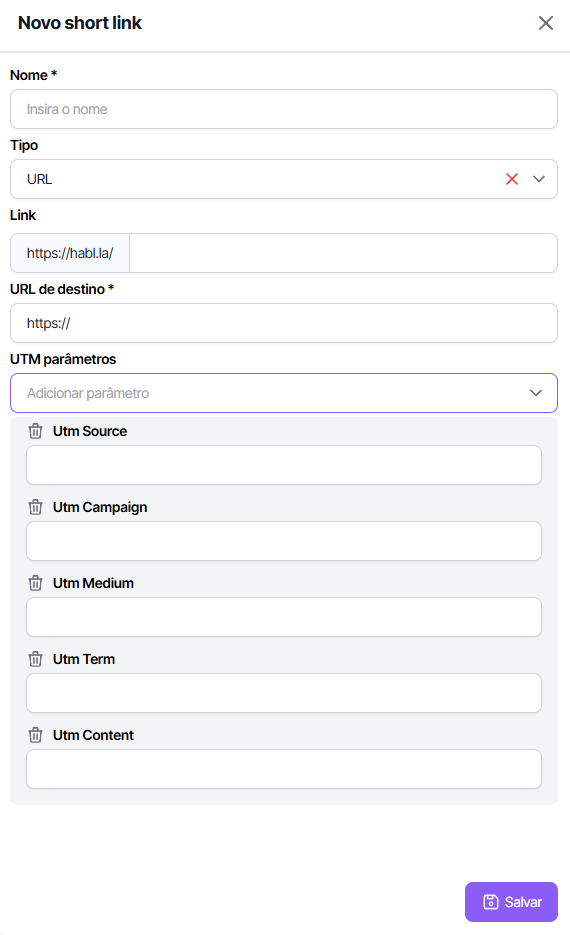
3. Fill in the fields:
* **Name** → internal reference (e.g.: `contact_us`)
* **Destination URL** → the full link to where it will be redirected.
* **UTM parameters** → set `utm_source`, `utm_medium`, `utm_campaign`, `utm_term` and `utm_content`.
4. Click **Save**. The system generates the short link and immediately starts tracking visits.
**Creation example:**
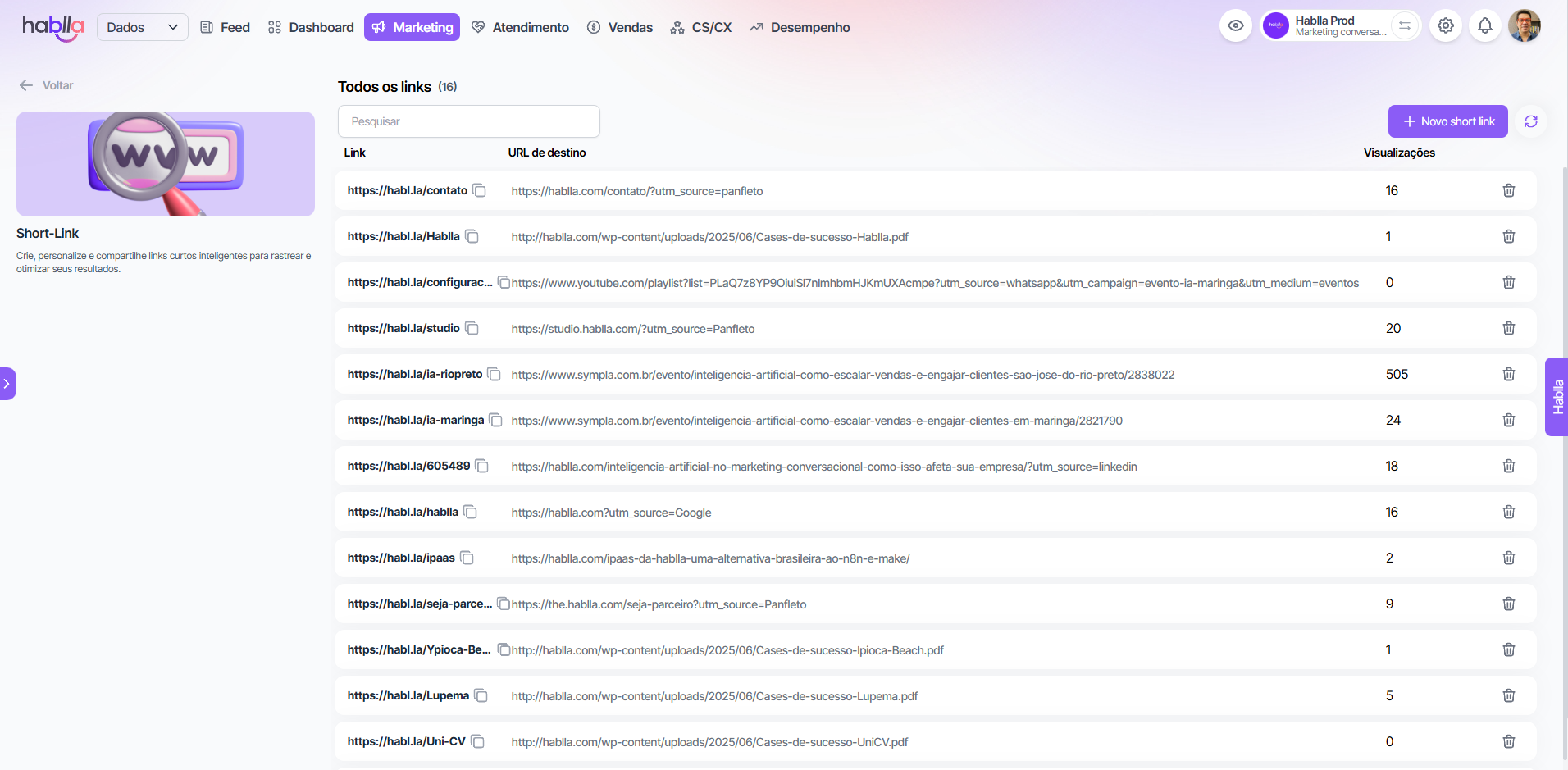
### What you see in the Short-Links list
* **Short link** generated (`habl.la/contact`)
* **configured destination URL**
* **Number of views** updated in real time
* Icon of **trash** to delete the link whenever you want
### View details and export QR Code
By clicking on an existing Short-Link, you access:
* **Short link preview** with option to copy
* **QR Code** to scan or download
* **UTM settings** that were applied
**Preview example:**
### Best practices for using Short-Link
* Use short, intuitive names (e.g.: `august-event`)
* Standardize UTM to maintain clarity in reports
* Use QR Codes in offline materials with high conversion
* Delete inactive or low-converting links regularly
***
#### Summary
Short-Link combines:
* **Simplified sharing** with short links and visual impact
* **Smart tracking** with configurable UTM parameters
* **Practical reports** of view + embedded QR Code
Use this tool to make your campaigns cleaner, trackable and more efficient.
---
# Agent Instructions
This documentation is published with GitBook. GitBook is the documentation platform designed so that both humans and AI agents can read, navigate, and reason over technical content effectively. Learn more at gitbook.com.
## Querying This Documentation
If you need additional information that is not directly available in this page, you can query the documentation dynamically by asking a question.
Perform an HTTP GET request on the current page URL with the `ask` query parameter, and the optional `goal` query parameter:
```
GET https://docs.hablla.com/hablla-docs-en/hablla/marketing/short-link.md?ask=&goal=
```
`ask` is the immediate question: it should be specific, self-contained, and written in natural language.
`goal` is optional and describes the broader end goal you are ultimately trying to accomplish on behalf of the user. GitBook uses it to tailor the answer towards what is most useful for that goal.
The response will contain a direct answer to the question and relevant excerpts and sources from the documentation.
Use this mechanism when the answer is not explicitly present in the current page, you need clarification or additional context, or you want to retrieve related documentation sections.