> For the complete documentation index, see [llms.txt](https://docs.hablla.com/llms.txt). Markdown versions of documentation pages are available by appending `.md` to page URLs; this page is available as [Markdown](https://docs.hablla.com/hablla-docs-en/automation-flows/components.md).
# Components
The **Hablla components** are the fundamental pieces to create automations and intelligent flows. They allow you to **capture information, process data and execute actions** in an automated way, without needing to program.
Each component has a specific function and can be combined with others to create personalized and highly efficient flows.
***
### 🔹 **What are Components in Hablla?**
In Hablla, components are **functional blocks** that allow integrating different systems, processing information and creating automatic rules within automation flows.
✔️ **Usage Example:**\
📥 A lead fills out a form → WhatsApp sends an automatic message → The opportunity is registered in the CRM → A task is created for a salesperson.
Components enable this communication and automation between systems.
***
### 🚀 **List of Available Components and Their Functions**
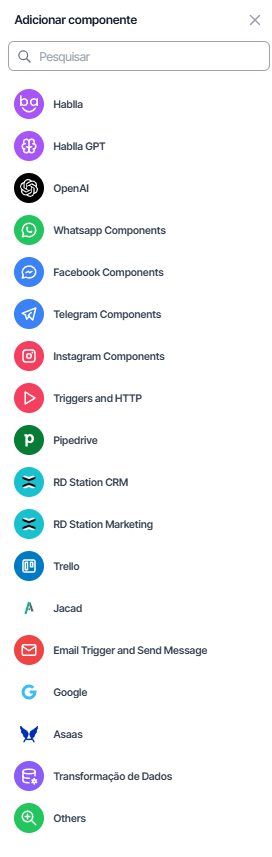
Below, you will find the **main components available in Hablla** and what each of them does:
#### 🔮 **Hablla and Hablla GPT**
* **Hablla**: Native platform components for data manipulation, automation and flow control.
* **Hablla GPT**: Allows creating autonomous AI agents for service, message automation and text analysis.
📌 **Usage Example:** Create a **virtual agent** that answers questions automatically.
***
#### 💬 **Communication Channels**
Are components responsible for **input and output of messages** in the main conversational channels.
**📱 WhatsApp Components**
* Receives and sends messages via WhatsApp.
* Allows automatic interactions and sending HSM templates.
* Connects with chatbots and human agents.
📌 **Usage Example:** Send an automatic message to a qualified lead.
**👥 Facebook Components**
* Manages Messenger messages.
* Allows automations and interactions on Facebook.
📌 **Usage Example:** Create a service flow to respond to messages received on Messenger.
**🚀 Telegram Components**
* Receives and sends messages on Telegram.
* Has support for bots and advanced automations.
📌 **Usage Example:** Create a bot on Telegram to capture leads.
**📸 Instagram Components**
* Replies to messages in Instagram Direct.
* Allows capturing interactions and creating automations.
📌 **Usage Example:** Send an automatic message to someone who comments on a post.
***
#### 🔥 **Integrations and APIs**
Are components that **connect Hablla with other platforms** to send and receive data.
**⚡ Triggers and HTTP**
* Allows configuring **webhooks** to receive and send information to other platforms.
* Starts automations whenever an external event happens.
📌 **Usage Example:** When a customer makes a purchase, a webhook can be triggered to create a post-sale opportunity.
**📊 Pipedrive**
* Connects to the Pipedrive CRM for **creation and updating of deals**.
📌 **Usage Example:** Create a new deal in Pipedrive when a lead responds on WhatsApp.
**🔄 RD Station CRM and RD Station Marketing**
* Integrates with RD Station CRM and Marketing to register leads, update opportunities and send campaigns.
📌 **Usage Example:** Send a qualified lead from WhatsApp to RD Station Marketing.
**✅ Trello**
* Creates, updates and moves cards within a Trello board.
📌 **Usage Example:** Automatically create a card when a new task is recorded in Hablla.
**📧 Email Trigger and Send Message**
* Allows sending and receiving automated emails.
📌 **Usage Example:** Trigger an automatic confirmation email after a customer registers.
**🔍 Google**
* Integrates with Google services, such as Sheets, Drive and Analytics.
📌 **Usage Example:** Record lead data in a spreadsheet automatically.
**💳 Asaas**
* Connects to the Asaas payment system, allowing creation of charges and tracking invoices.
📌 **Usage Example:** Automatically generate a boleto for a customer who made a purchase.
**🔀 Data Transformation**
* Processes, formats and manipulates information before sending it to other components.
📌 **Usage Example:** Convert a phone number before sending it to another system.
**🛠 Others**
* Gathers other integrations and diverse functionalities within Hablla.
📌 **Usage Example:** Create custom connections with external APIs.
***
### 🔹 **How to Add a Component to the Flow?**
1️⃣ **Click the "Add Component" button** inside Hablla Studio.\
2️⃣ **Choose a component** from the displayed list.\
3️⃣ **Configure the parameters** (such as channels, integrations or input and output variables).\
4️⃣ **Save and connect the component** to the desired flow.
***
### 🎯 **Conclusion**
Hablla components allow you to **create intelligent flows, automate processes and connect different systems**, all in an intuitive way.
🚀 **By combining these components, you can create a highly efficient service and automation experience!**
---
# Agent Instructions
This documentation is published with GitBook. GitBook is the documentation platform designed so that both humans and AI agents can read, navigate, and reason over technical content effectively. Learn more at gitbook.com.
## Querying This Documentation
If you need additional information that is not directly available in this page, you can query the documentation dynamically by asking a question.
Perform an HTTP GET request on the current page URL with the `ask` query parameter, and the optional `goal` query parameter:
```
GET https://docs.hablla.com/hablla-docs-en/automation-flows/components.md?ask=&goal=
```
`ask` is the immediate question: it should be specific, self-contained, and written in natural language.
`goal` is optional and describes the broader end goal you are ultimately trying to accomplish on behalf of the user. GitBook uses it to tailor the answer towards what is most useful for that goal.
The response will contain a direct answer to the question and relevant excerpts and sources from the documentation.
Use this mechanism when the answer is not explicitly present in the current page, you need clarification or additional context, or you want to retrieve related documentation sections.