> For the complete documentation index, see [llms.txt](https://docs.hablla.com/llms.txt). Markdown versions of documentation pages are available by appending `.md` to page URLs; this page is available as [Markdown](https://docs.hablla.com/french/rapports/rapports-et-journaux-de-hablla/personnes-par-etiquette.md). Agents can also search and read this documentation through its [MCP server](https://docs.hablla.com/~gitbook/mcp).
# Personnes par étiquette
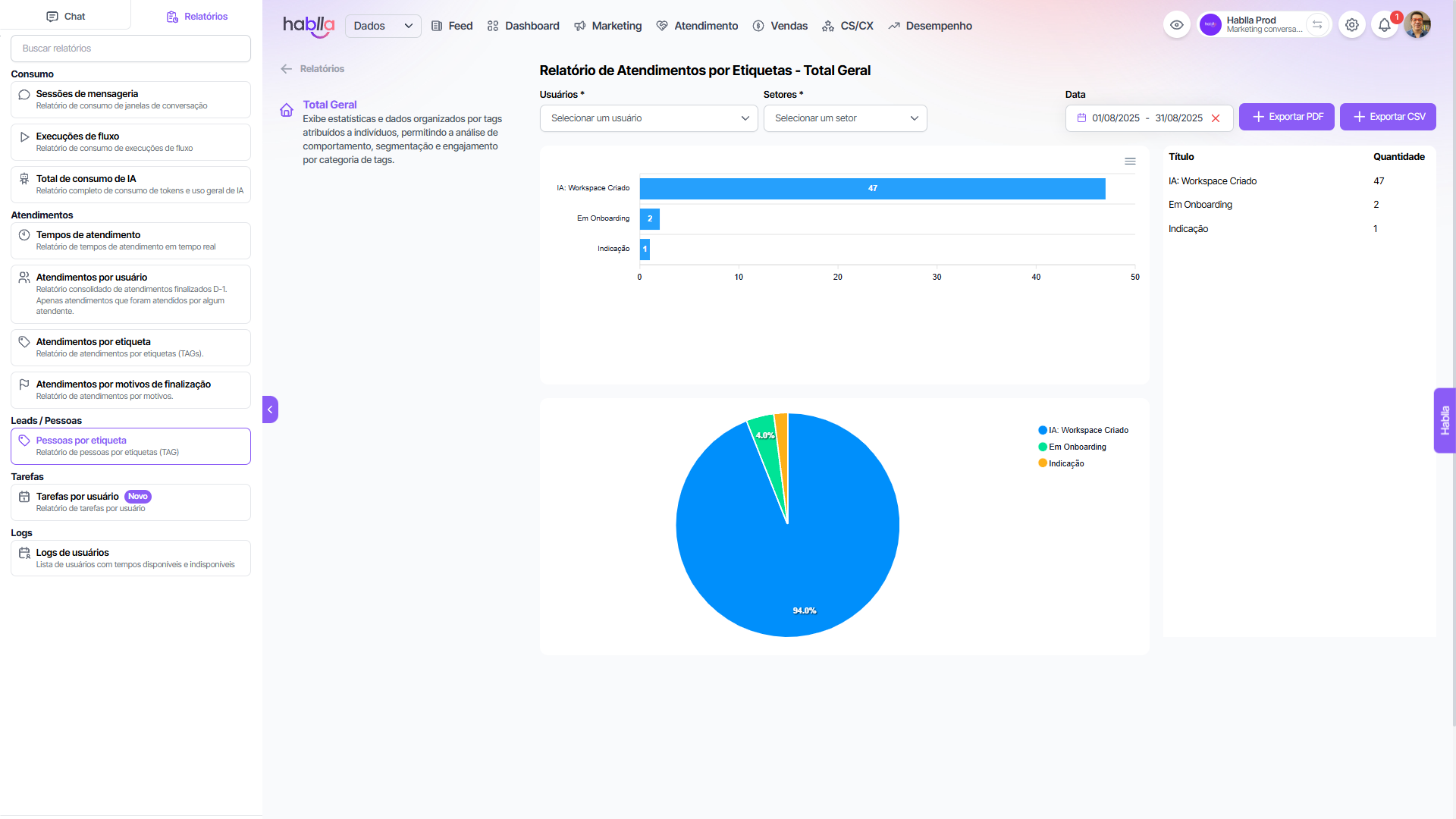
Rapport des personnes par étiquettes (TAG)
#### Personnes par étiquette
Le rapport de **Personnes par étiquette** permet de segmenter les leads, clients et contacts à partir des **tags appliquées pendant le parcours**, facilitant l'analyse comportementale et la priorisation des stratégies d'engagement.
Principales fonctionnalités et avantages :
* **Segmentation avancée**: permet de regrouper les personnes par statut comme *IA : Workspace créé*, *En onboarding*, *Parrainage*, entre autres, créant des clusters stratégiques de suivi.
* **Gestion du parcours client** : chaque étiquette reflète une étape du cycle de vie (ex. : onboarding, parrainage, qualification des leads), permettant de surveiller où se trouvent les plus grands volumes de clients et d'opportunités.
* **Priorisation des efforts** : en comprenant quels groupes ont la plus grande représentativité, les équipes peuvent allouer les ressources de support, ventes et customer success de manière plus intelligente.
* **Insights pour la croissance** : des étiquettes comme « Parrainage » ouvrent la possibilité de mesurer l'impact des programmes de parrainage, tandis que « Onboarding » met en évidence les goulots d'étranglement ou les avancées dans la mise en œuvre.
* **Personnalisation des campagnes** : en croisant les tags avec les données de consommation et de support, il est possible de créer des campagnes ultra ciblées, alignées au contexte de chaque groupe.
Ce rapport est clé pour appliquer les **8C du Marketing Conversationnel** en pratique, garantissant **commodité, cohérence et confiance** dans chaque interaction.
---
# Agent Instructions
This documentation is published with GitBook. GitBook is the documentation platform designed so that both humans and AI agents can read, navigate, and reason over technical content effectively. Learn more at gitbook.com.
## Querying This Documentation
If you need additional information that is not directly available in this page, you can query the documentation by asking a question.
Perform an HTTP GET request on the following URL with the `ask` and `goal` query parameters:
```
GET https://docs.hablla.com/french/rapports/rapports-et-journaux-de-hablla/personnes-par-etiquette.md?ask=&goal=
```
`ask` is the immediate question: it should be specific, self-contained, and written in natural language.
`goal` is what the user is ultimately trying to achieve, the reason they need the answer. Sharing it helps GitBook give you a better, more relevant answer. A goal is most helpful when it describes the outcome the user wants rather than restating the question. For example, with `ask=how do I create an API token`, a goal like `automate deployments from our CI pipeline` lets GitBook tailor the answer to that use case.
The response will contain a direct answer to the question and relevant excerpts and sources from the documentation.
Use this mechanism when the answer is not explicitly present in the current page, you need clarification or additional context, or you want to retrieve related documentation sections.